Weeknotes-21-10-15

October 8, 2021

Much of this week at work felt like settling back into the usual rhythm.

Monday: meetings and catching up with things and people, putting out minor fires and preparing for the week ahead.

Tuesday: I spent the day online with students, doing the first ‘programming’ session practicing problem solving with a fake programming language. Last year’s students had christened this fake language ‘MartinScript’; this year’s went with ‘BennyScript’. I have not taken this personally. The session itself seemed to go well, there was good engagement, and some of the students even carried on afterwards to attempt the problem solving with a real programming language, which was awesome to see.

Wednesday: CompJ Lab + the usual Wednesday meetings.

Thursday: another day on site, this time introducing the assessment for the Computational Thinking module.

Friday: possibly the most interesting day of the week. 4 open forums with different groups of students, where we were able to talk about some of the things we’re interested in as a School, but also hear some of the issues students are facing, and start to solve them. The turnout varied a bit between the years, but everyone who turned up had some interesting and useful things to say, and by the end of Friday afternoon I’d already managed to put out a few minor fires around the place. A tiring day though, spent almost solidly in Teams meetings (especially when you throw in a DLT forum with the PVC halfway through the day) - by the end of the day I was horizontal on the office sofa with the sleeping pup, attempting to send emails without falling asleep myself.

Overall then, a strangely ‘standard’ week. A couple of work highlights (apart from the teaching) were around some input I managed to have into a couple of new things on the horizon: I managed to make a positive impact on some potential new job roles, and on some curriculum development guidance. Small wins, but I’ll take them where I can.

Outside of work though, a really positive week. Having been accustomed to being a solo runner for a very long time, I realised when parkrun returned that actually I do enjoy the social side of running, and having people around while running is good for me. So, I took the plunge and joined a local running club. I originally signed up for two trial runs: a training session on Monday and then a conversational run on Wednesday, thinking I’d make a decision about joining once I’d done them both. Monday night we did hill sprints on a hill in Penarth and I had such a good time I paid my subs the minute I got home and signed up. Wednesday was a really pleasant gentle run around strangetown where I managed to talk to quite a few other people and had a very nice time. I’m looking forward to having a little bit of a more regular structure to my running (which I’ve missed since stopping the running commuting) and also to having more social things going on.

riding or running or that

Did Parkrun at Grangemoor on Saturday, another 30 seconds off the time, so we’re getting closer…plus there’s that whole ‘running club’ thing.

Did the really really ‘old’ commute a couple of times to get to the Queen’s buildings for in-person teaching. Turns out I can cycle between the two sites in about three minutes, which is very handy when you get caught talking in your office in Abacws five minutes before you’re due in class in Queens…

Weeknotes-21-10-08

October 8, 2021

Oh, we’re back baby.

What a first week back. Monday was a blur of teaching prep, the usual start of week meetings and catch-ups, and then in the evening the first virtual governors meeting of the year for one of the Schools I’m involved with.

Tuesday was when the semester really kicked off with the first online teaching session of the year. I had a lot of pre-game nerves for some reason, which is unusual. It got so bad that I had to stop work on Tuesday morning and go out for a run across the barrage and back just to get rid of some of the energy. The teaching session itself was fantastic though; the students were engaged and interactive, the activities went well, and everyone loved Bennie (of course).

On Wednesday it was my first small in-person session; we had our first ‘lab’ with the CompJ students, and we really got to use the new building for the first time. We all met up in one of the seminar rooms, set them a task, then sent them off to work somewhere else in the building. We could then wander between the different collaboration spaces meeting with the teams and making sure all was well. It worked beautifully - exactly the kind of dynamic, flexible and collaborative teaching the building was designed for.

Thursday was the real highlight - in person teaching with a much larger group of students, back in what has been my teaching ‘home’ for the last few years: The Turing Suite in the Data Science Academy space in Queens. It was lovely to be in a big flat active space with students again, and they rose to my challenge (‘recreate the Cardiff University homepage in an hour and a half after only a few days teaching in HTML & CSS’) with great enthusiasm. It was also nice to see a lot of my TA colleagues in person again for the first time in 18 months, and to meet one of our TAs who I’ve previously only met through Zoom/Teams.

Interestingly one of the students approached me after the session to ask what the point of the session was. They explained that they were a ‘beginner at web things’, and they’d expected to come to the session to be taught HTML and CSS, and hadn’t expected to spend a couple of hours working with others to actually create a website. I think it partially means I’d not done a good job at explaining the structure of the week and the session, so there’s a ‘note for next time’, but also partially speaks to a perception some students have that unless there is someone stood at the front ‘imparting wisdom’ then whatever is happening in the classroom isn’t ‘teaching’. I talked them through everything that had happened this week:

  • Monday I’d given them several pages of notes to read, some links to tutorials to look at, and some videos explaining the theory for them to look at during the week
  • Tuesday we’d met up online, done a lot of Q&A, I’d done some live coding demos, then re-introduced the notes and self-study exercises.
  • Wednesday having asked students to send me their outputs from the self-study exercises once they completed them, I spent a couple of hours responding and providing feedback where there was something I could comment on
  • Thursday we’d got together in person and I’d gone through some group feedback on the exercises, then set them a group challenge to work together to put everything they’d seen this week into practice. This was purposefully a hard task to get them to discuss the ideas, seek out further information, and start learning how to expand their core knowledge themselves, with their peers (and with myself and the TAs as backup for when they got really stuck)

Each one of these things is an important part of the ‘teaching’, and I would estimate it all adds up to at least 15 hours of ‘learning’ for the students over the week (and that’s only for my part of the module). Somehow though, because I spent only ten minutes actually stood in front of them talking, it’s not ‘teaching’?

More work to do then on the expectation setting and explaining the process…

riding or running or that

Did Parkrun at Grangemoor on Saturday, took a minute off my last time there. Still some way off a PB, but the fitness is improving

Tried a new version of the ‘old’ commute. As suspected getting through the city centre is tiresome, but it was still ten minutes quicker

listening

Oh my heart. LOVE THIS

Weeknotes-21-10-01

October 1, 2021

Right, back to this then is it? Well, it’s been quite the week, so why not celebrate with a weeknotes…

This week was induction week, when all our new students officially enrol with us for the year, and we get to meet them for the first time. For years induction week was my own personal hell, back when I was running operations for the Postgraduate courses in the School, at a time of unprecedented growth. The logistics of trying to get a few hundred students to meet everyone they need to meet (and each other), get the information they need and prepare them for the teaching that will start next week is a real challenge. These days I get to sit back and the organisation is handled by others. Having been so involved in the process previously its one of those difficult times where having moved to another level of management you have to work very hard not to start butting in to your ‘old’ job; treading that fine line between offering some advice from your own experience and micro-managing tasks. Fortunately the team running induction are incredibly capable, so my involvement was limited to signing on to a few Zoom calls[1] and saying hello to all the new and returning students, which was a pleasure.

Outside of the School induction, we also got to meet our new batch of CompJ students. Once again we’ve got a really fantastic mix: some working journalists, some people just out of university, some techy/CS types. They seem like a good bunch and I think they’ll keep Aidan and I on our toes. One of the highlights of their induction (for me anyway) was the Data Walk on Monday. We took them out of the building and around some of the city, stopping off in a few places to consider different elements of data collection. Of course, this being Cardiff the weather fluctuated wildly from gloriously sunny to absolutely chucking it down, and we went from happily strolling along the river in the sunshine to sheltering under a fir tree in the park, desperately trying to stay dry in a downpour. A brilliant introduction to the city, and probably a moment the students will remember for a long time!

This week was also the first week that we were able to really start using our shiny new building. I spent my first full day ‘in the office’ since early 2020. I saw a lot of people, some of whom I’ve not seen for ages. I was also reminded of the dangers of working in the office when I was interrupted at least fifteen times by people dropping by to ask seemingly random questions. My office setup is also not quite right; my new standing desk is lovely, but the webcam and microphone I’ve got at work are nowhere near as good as the kit at home, so I may need to upgrade. Also my work laptop is still rubbish, so thats going to need sorting soon, I’ve spoiled myself by using my personal macbook for work for too long.

One of the more interesting things about the new building isn’t the lovely teaching rooms, or the socialising, or all the collaboration spaces, but the commute. I cycled all the way from Penarth to the new building and there were only two small sections where I was mixed in with road traffic. The rest of the route is entirely segregated cycle lanes. It makes for a much less stressful journey, even if it is a couple of km further than the old commute. I need to try out a route that’s a bit more like the ‘old’ commute across the barrage, but as ever it’s that tricky ‘getting across the city centre from south to north’ that makes it difficult. Oh for a cycleway straight up the Hayes…

Overall it was a positive week. Outside of induction events and prepping for teaching next week I had a lot of meetings where we talked about the future and things that we’re going to do this year and they made me feel like we’re moving in the right direction. Onwards.

listening:

New PSB album hasn’t grabbed me the same way as Every Valley did, but this is great


  1. We’re doing a lot of induction online because our shiny new building wasn’t quite all ready at the time we were planning, and we didn’t want to risk more chaos! ↩︎

Embedding an external website in Blackboard

October 21, 2020

Imagine that you’ve written a set of course notes using your favourite static site generator, and that you’re using a modern development process to automatically check, compile, and publish that site to the web. Wouldn’t it be great if that automatic build process could also automatically update the course notes in your University’s VLE?

It sure would!

But it can’t. At least, not if you’re using Blackboard, like us. Or at least, not if you’re using Blackboard in the way we’re using it.

But wait! All is not lost. If we’re using our super duper modern dev process to deploy to a securely hosted website, we can simply embed that site inside our VLE! That way any updates we push to the course notes will automatically be reflected in the VLE pages for our module. Our students can access the notes either through the VLE or by visiting the external site itself, and everyone wins!

Embedding in Blackboard

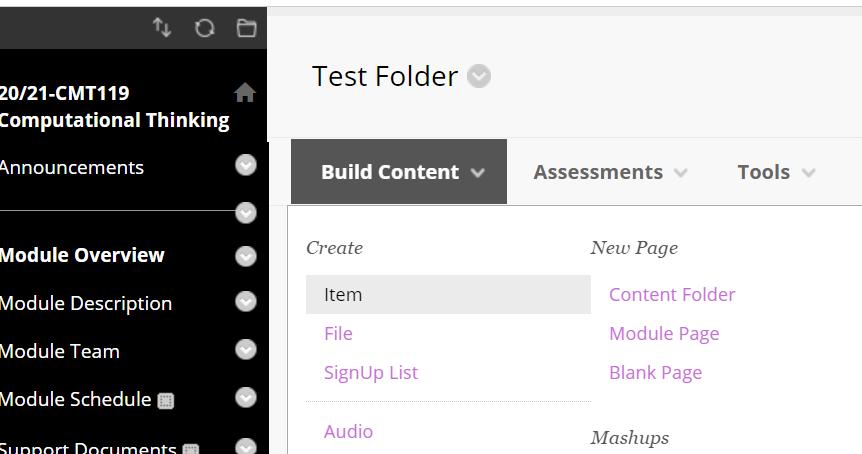
Embedding an external website in Blackboard is actually surprisingly easy. First, we need to find the place in our module where we want to put the notes, click ‘Build Content’ and then ‘Item’ under the ‘Create’ section:

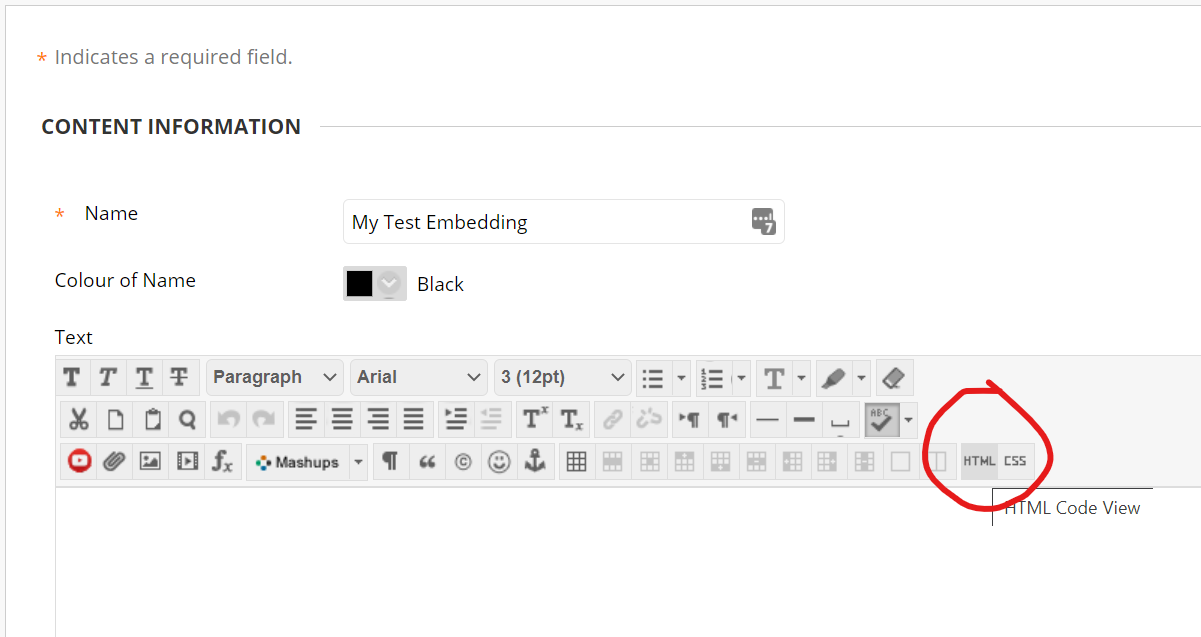
Then we want to click the ‘HTML’ button on the content editor:

create a content item

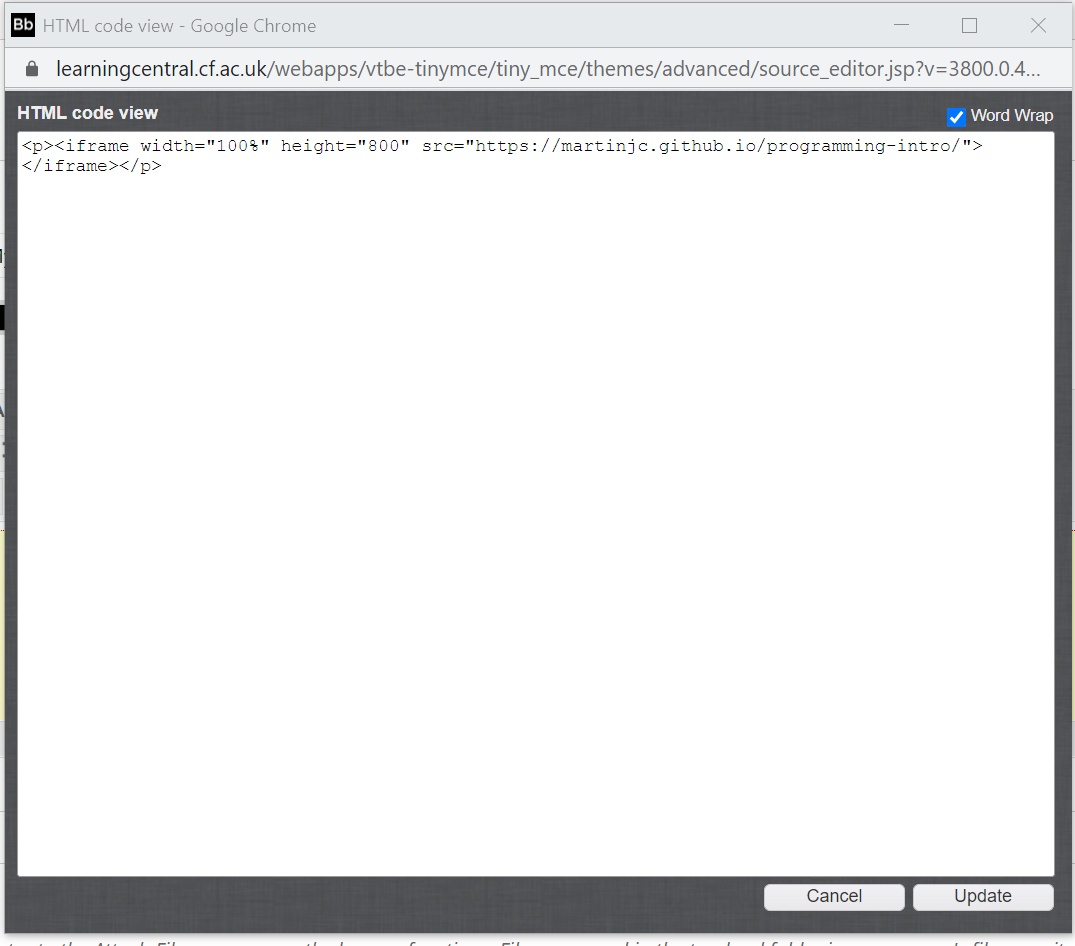
In the HTML editor that opens we’ll want to add an <iframe> that embeds our notes pages. We can set the width to 100% to make the most of the space, and set the height to whatever you think makes sense. Remember that people need to be able to see content to read it, so I’d advise something bigger than 0px.

create a content item

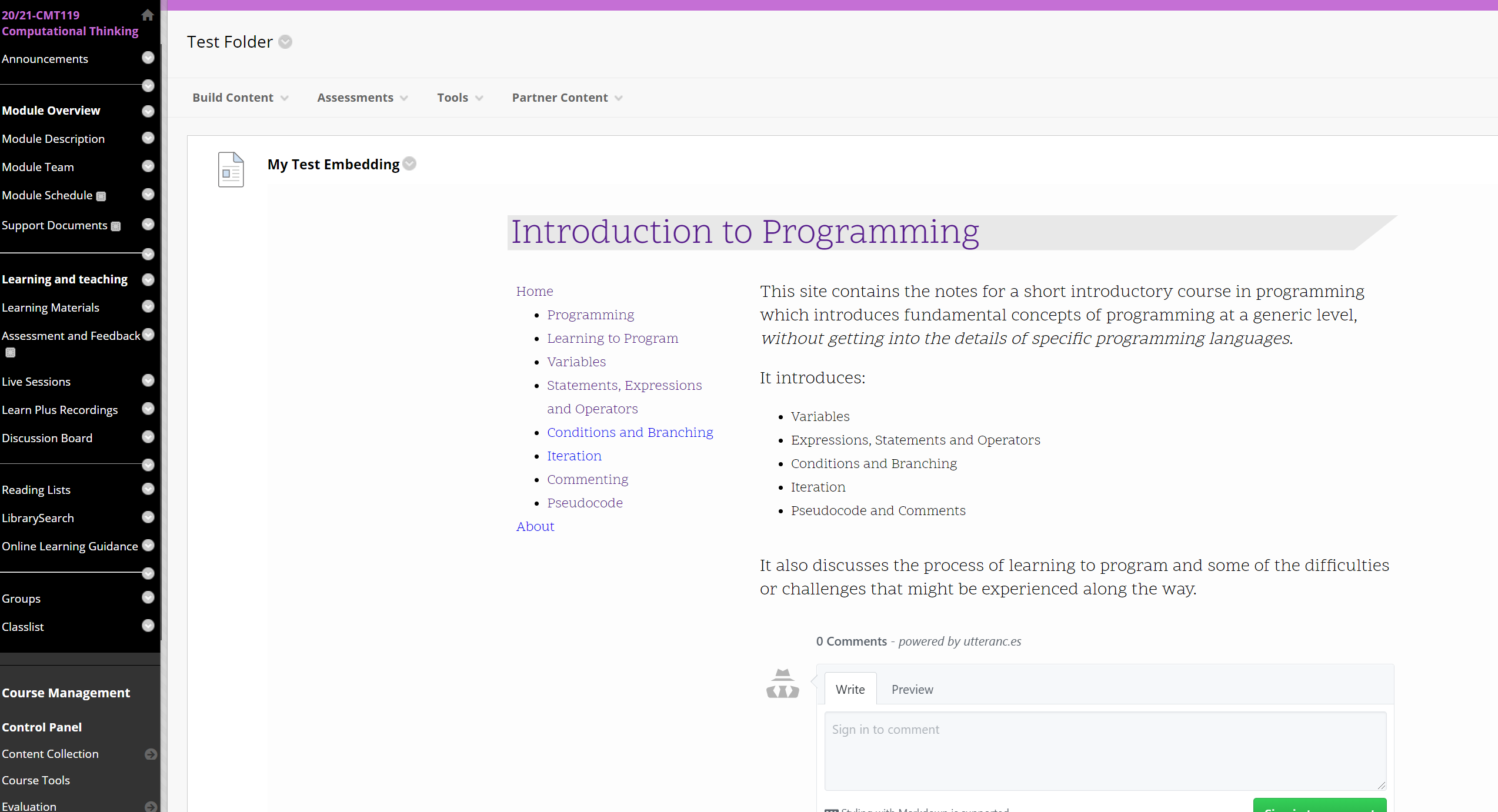
Update your content, submit the new content item (yes, you’re not imagining things, that really was two clicks to accept your changes where one would have done …) and voila! One website embedded in your VLE. Students can easily find your notes, and you can easily keep them up to date using a super smooth and simple build process, rather than whatever editor and process your VLE demands of you:

create a content item

Adding quiz questions in Eleventy

October 20, 2020

So, lets say that hypothetically you have written a set of course notes in an 11ty site and you want to add some quizzing to the pages so that students can quickly check their grasp of the material they’ve just read. How would you do that? Here’s a possible solution…

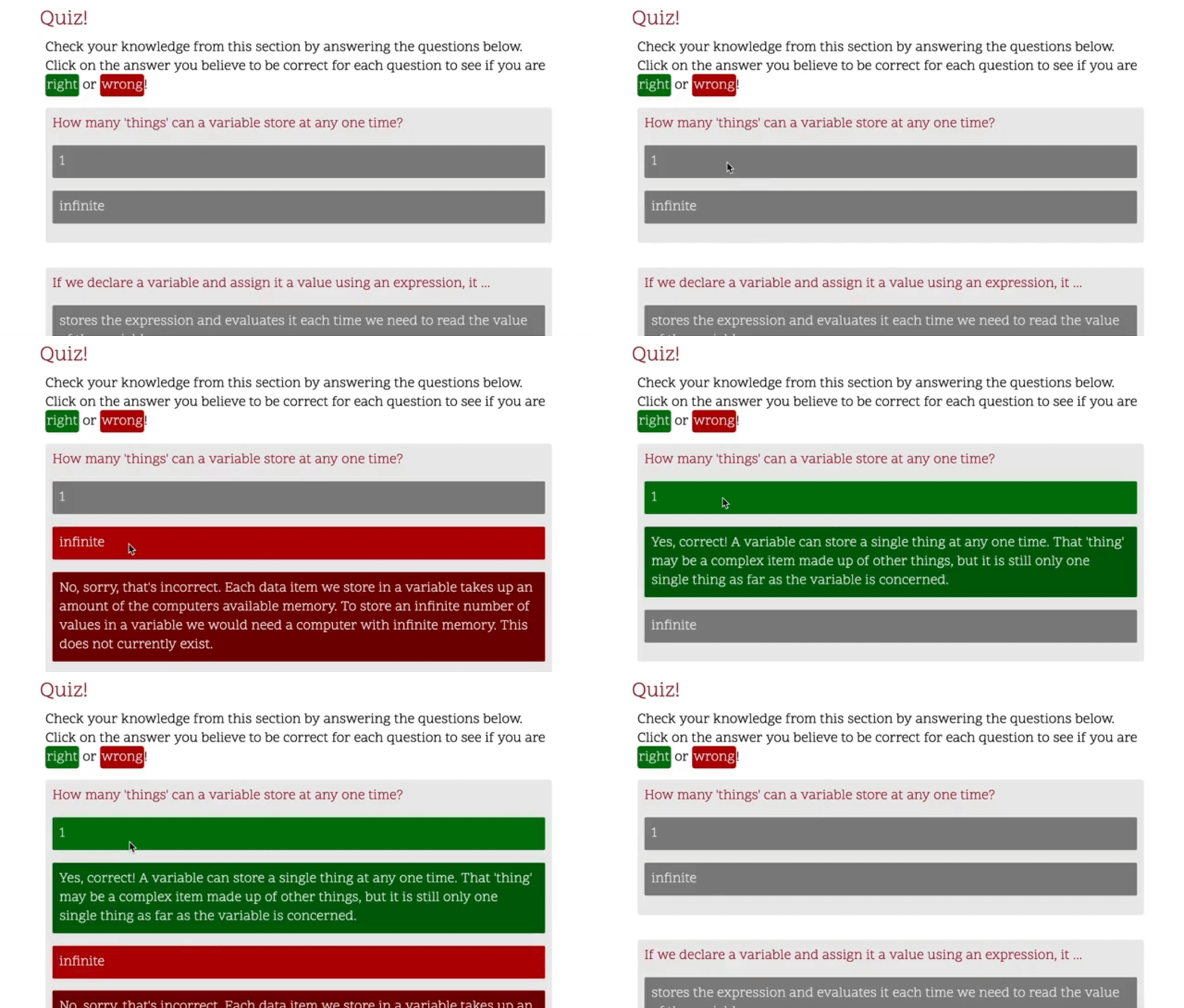
quiz screenrecording

Data files

The first issue - where can we store our questions that we’d like to quiz readers with? Eleventy templates can pull in data from all sorts of places. One such place is any *.11tydata.json file that has the same name as one of your markdown files. So, if we have a file variables.md , we can store some questions as json in variables.11tydata.json, and this data will be made available inside the final variables page. An example data structure might look like this:

{
"questions":[
{
"question": "How many 'things' can a variable store at any one time?",
"answers": [
{
"answer": 1,
"correct": "true",
"feedback": "Yes, correct! A variable can store a single thing at any one time. That 'thing' may be a complex item made up of other things, but it is still only one single thing as far as the variable is concerned."
},
{
"answer": "infinite",
"correct": "false",
"feedback": "No, sorry, that's incorrect. Each data item we store in a variable takes up an amount of the computers available memory. To store an infinite number of values in a variable we would need a computer with infinite memory. This does not currently exist."
}
]
}, ...

The questions object inside the .json file will end up as a variable inside our page template. So, given that, how do we get the questions from the .json and into the page?

Shortcodes

11ty allows us to define our own shortcodes that mean we can create reusable snippets of code (layout etc) that we can use all over our 11ty site. We could define an 11ty shortcode as a JavaScript function that takes our questions as input, and returns the HTML code that should be inserted into the template to display the question:

insertQuestions: (questions) => {
let template = ``;

questions.forEach((q, i) => {
template += `
<div class="question-block" id="q-block
${i}">
<p class="question" id="q
${i}">${q.question}</p>`
;

q.answers.forEach((a, j) => {
template += `
<div class="answer-block" id="a-block
${j}" data-correct="${a.correct}">
<p class="answer" id="a
${j}">${a.answer}</p>
<p class="feedback hidden">
${a.feedback}</p>
</div>
`
;
});
template += `</div>`;
});
return template;
},

We then register this new shortcode with our eleventyConfig:

eleventyConfig.addShortcode("questions", shortcodes.insertQuestions);

And now our shortcode is available to be used in our variables.md file:

{% questions questions %}

Once 11ty has done it’s magic and built our site, we end up with:

<div class="question-block" id="q-block0">
<p class="question" id="q0">How many 'things' can a variable store at any one time?</p>
<div class="answer-block" id="a-block0" data-correct="true">
<p class="answer" id="a0">1</p>
<p class="feedback hidden">
Yes, correct! A variable can store a single thing at any one time. That 'thing' may be a complex item made
up of other things, but it is still only one single thing as far as the variable is concerned.
</p>
</div>
<div class="answer-block" id="a-block2" data-correct="false">
<p class="answer" id="a2">infinite</p>
<p class="feedback hidden">
No, sorry, that's incorrect. Each data item we store in a variable takes up an amount of the computers
available memory. To store an infinite number of values in a variable we would need a computer with infinite
memory. This does not currently exist.
</p>
</div>
</div>

So that’s the data in a nice format for storage and editing, nicely separated from the notes content, but able to be inserted into the final built page. How then do we make it into a real quiz, where the reader can choose an answer?

Bring on the JavaScript!

Yes, we’ll solve this problem the way we solve everything in web development … we’ll throw a load of JavaScript at it:

document.querySelectorAll(".answer-block").forEach((d) => {
d.addEventListener("click", (e) => {
d.querySelector(".feedback").classList.toggle("hidden");
d.classList.toggle("selected");
});
});

Okay, it’s not really a large amount of javascript.

We add this into our page layout, and then it’ll be present on all the notes pages. This JS will find all the answers in our page and add a listener to them that will fire whenever someone clicks on one of the answers. The listener calls a function which finds the feedback associated with that answer and toggles a ‘hidden’ class, which we’ll use to show and hide the feedback. It will also toggle the ‘selected’ class on the answer itself. That’s all the JS we need for the answer selection, so what gives us the rest of the quiz functionality?

Bring on the CSS!

Yes! We could do a whole lot of this in JS, but JS is very bad and we should keep it to a minimum. So let’s do the showing and hiding with CSS instead. Actually .sass in this case:

.hidden {
display: none;
}

.answer-block {


&[data-correct="false"].selected {
.answer {
background-color: #b00900;
}

.feedback {
background-color: #750600;
}

}

&[data-correct="true"].selected {
.answer {
background-color: #007506;
}

.feedback {
background-color: #006205;
}
}
}

Here we set the .hidden class to display none. This way any feedback with the hidden class applied will be hidden, and when the hidden class is removed (when we click on an answer) it will be shown. Then in the second set of rules we select the answers that are incorrect and colour them a shade of red, and colour the answers that are correct green. Job done.

quiz screenrecording

Using eleventy to create a short-course website in Markdown

October 19, 2020

I’m re-writing some course notes, as I usually do at this time of year, and I’m trying to separate things up into small reusable chunks, so that rather than building a comprehensive set of notes/videos/resources for an entire module, I create a range of small short-course type resources on different topics that can be built up for my module, or made available to be re-used by other people.

Previously, I’ve created websites for a module using a static site generator. This year, having fallen out of love with Hugo I thought I’d see about using 11ty.js for this task.

There’s some drawbacks in abandoning Hugo for 11ty as far as the ‘quickly get a set of course notes up and running’ goes. Chief among these is that as a ‘young-ish’ technology, 11ty is still maturing in the ‘themes’ department and functionality. Whereas there’s a rich set of templates and themes for creating academic/instructional courses using tools like Hugo or Jekyll, there’s not that much out there for 11ty, so rather than adapt an existing example (which tend to be more for portfolio sites or blogs) I figured I’d build this from scratch.

The approach I’ve taken looks a little something like this. This is still a WorkInProgress, so I expect some of this will change as the semester goes on, but as a starting point I’m pretty happy with where I am.

Contents

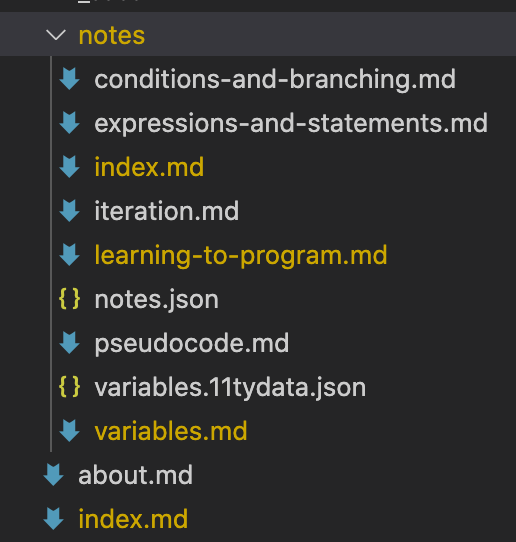
The contents of the notes are written in markdown. Nothing complicated here, just regular markdown. I don’t tend to do anything too fancy as far as mathematics or diagrams are concerned, so a fairly basic set of markdown notes, arranged into sections based on topic in a notes folder, with a top-level index and an about page:

File structure of the notes markdown files

See those json files? We’ll come back to the variables.11tydata.json in the future but the notes.json is a shortcut file, all it has in it is:

{
"tags": "notes"
}

This means that anything in the ‘notes’ folder will be tagged with notes. 11ty automatically builds collections based on tags, so by tagging everything in the folder with ‘notes’ we automatically get a collection of those pages we can use later.

For a set of course notes or documentation there’s two things I like to have:

  • a navigation menu that leads to each of the pages and allows us to view the overall structure
  • a way to step through the pages in order one after the other

Sidebar navigation

I’m using nunjucks templates for the page layouts here. Part of the notes page template looks like this:

---
layout: base.njk
---

...

<nav class="sidebar">
<a href='/'>Home</a>
<ul>
{%- for note in collections.notes | sortByPageOrder -%}
<li><a href="."></a></li>
{%- endfor -%}
</ul>
<a href="/about/">About</a>
</nav>

...

Here we loop through our collection of notes to add a link for each page to the navigation. 11ty automatically orders collections by date. This doesn’t suit our purposes as we want to order the pages by topic so that readers can follow the notes in the correct order. So, we add an order data item to the .yaml data for each page:

---
layout: page
order: 6
title: Iteration
---

We write a function in our 11ty config that will sort pages by this order variable, and add it as a filter, referenced in the template above:

function sortByPageOrder(values) {
return values.slice().sort((a, b) => a.data.order - b.data.order);
}
eleventyConfig.addFilter("sortByPageOrder", sortByPageOrder);

Now we can determine the page order and the pages will be listed in our navigation in the order we specify.

Stepping through pages

11ty has a nice pagination feature for collectons that means once we have a collection that’s ordered, we can easily find out what page is next in the collection. We can use this in our notes page template to add stepping links backwards and forwards through our pages just below the page contents:

<div class="nextprev">
{%- set nextPost = collections.notes | sortByPageOrder | getNextCollectionItem(page) %} {%- if
nextPost %}
<p class="next">Next: <a href="."></a></p>
{% endif %} {%- set previousPost = collections.notes | sortByPageOrder |
getPreviousCollectionItem(page) %} {%- if previousPost %}
<p class="previous">Previous: <a href="."></a></p>
{% endif %}
</div>

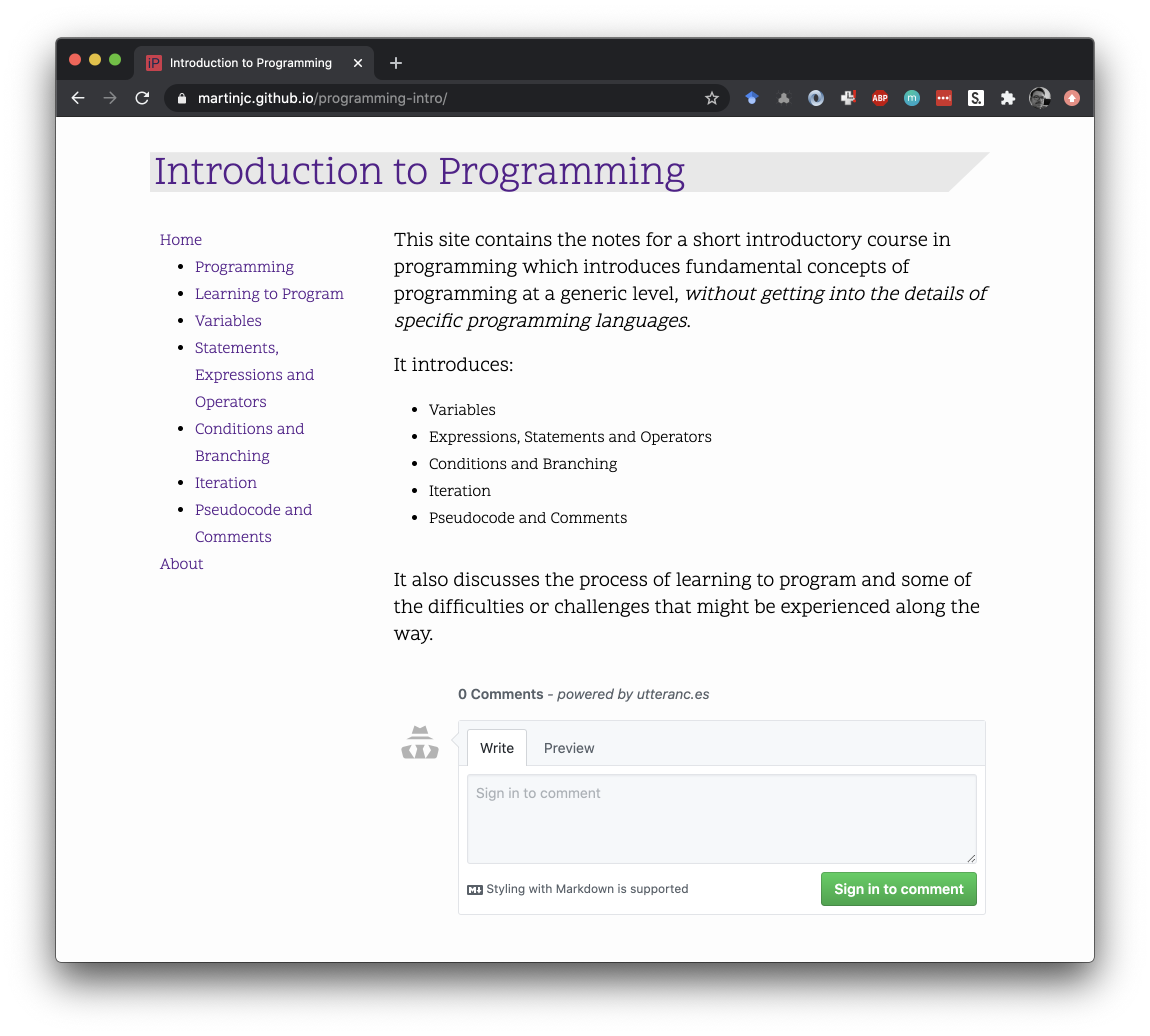
Putting this all together with a (pretty much) default 11ty setup and a little CSS to lay things out nicely we end up with a nice documentation/course notes site that has navigation between each topic, all built from markdown.

Notes website screenshot

The full code for the site is on github, and in the next post I’ll talk about some of the other features I’ve added to the site.

WCP and LEJOG data analysis

August 21, 2020

Since this whole lockdown thing happened, I’ve hit the running hard. Since the start of March I’ve run about 600km, which is about 200km more than I ran in the whole of 2019. I’m using running as stress relief, and there’s a lot of stress around, so there’s a lot of running to be done.

While I’m running so much, and partly as a motivator to ensure I don’t slack off and stop running I thought I should enter some virtual events. I found the events I needed in the Wales Coast Path (WCP) and Lands End to John 'O Groats (LEJOG) virtual runs being put on by EndToEnd running. In these events you have a year to ‘virtually’ run the length of the Wales Coast Path (870 miles) or from Lands End to John 'O Groats (874 miles).

Being the data nerd I am, I wanted to be able to track my mileage in quite some detail, and hopefully predict when I should be able to finish these ridiculous challenges so of course I had to analyse it with a bit of Python. I’m storing data in a simple spreadsheet like this:

Day Date Mileage Cumulative
1 13/07/2020 12.99 12.99
2 14/07/2020 0 12.99
3 15/07/2020 0 12.99
4 16/07/2020 6.45 19.44

Loading this in to Pandas is straightforward, even more so using the excellent pathlib library, which I cannot recommend enough for manipulating files and directories

from pathlib import Path

DATA_FILE = Path.home() / 'Some' / 'folders' / 'where' / 'data' / 'is' / 'WCP.xlsx'

# data is in two sheets in the file, and we want the first row as a header
run_data = pd.read_excel(DATA_FILE, sheet_name=['WCP', 'LEJOG'], header=1)

We’re going to analyse both runs at once, so lets set up some helpful dictionaries to hold some constants and other magic numbers etc:

RUNS = ['WCP', 'LEJOG']

# length of each run (miles)
LENGTHS = {
'WCP': 870,
'LEJOG': 874
}

# target lengths
TARGETS = [365,350,300,250,200,150]

# how many miles should we run each day for the given target?
RATES = {}
for run in RUNS:
RATES[run] = {}
for target in TARGETS:
RATES[run][target] = LENGTHS[run]/target

This spreadsheet has the dates for the rest of the year already entered, but we only want to analyse the data up to the present day and not worry about the future (an excellent life strategy, if not entirely sensible), so lets get rid of days with no data:

for run in RUNS:
run_data[run] = run_data[run].dropna()

So the first thing we want to do now we’ve cleaned the data is work out what our current run rate is in miles per day, and how much distance we have left for both of the runs:

CURRENT_RATES = {}
REMAINING = {}

for run in RUNS:
last_run = run_data[run].iloc[-1]
CURRENT_RATES[run] = last_run['Cumulative']/last_run['Day']
REMAINING[run] = LENGTHS[run] - last_run['Cumulative']

Which gives us, as of today:

CURRENT_RATES = {'WCP': 2.988088235294118, 'LEJOG': 3.0367499999999996}
REMAINING = {'WCP': 666.81, 'LEJOG': 752.53}

We can then use this information to predict how many days it will be until we finish the race, assuming the run rate stays the same:

DAYS_TO_FINISH = {}
for run in RUNS:
DAYS_TO_FINISH[run] = REMAINING[run] / CURRENT_RATES[run]

which gives us:

DAYS_TO_FINISH = {'WCP': 223.1560608297652, 'LEJOG': 247.8076891413518}

Once we know how many days we have left, we can add that to the first run date, and work out when we should finish each race:

PROJECTED_END = {}
for run in RUNS:
first_run = run_data[run].iloc[0]
start_date = first_run['Date']
PROJECTED_END[run] = (start_date + timedelta(days=DAYS_TO_FINISH[run])).date()
print('Predicted to finish {0} on {1}'.format(run, PROJECTED_END[run].strftime('%A %d %B %Y')))

which lets us know that:

Predicted to finish WCP on Sunday 24 January 2021
Predicted to finish LEJOG on Wednesday 17 March 2021

So just another 5 to 8 months of running to go. Best go get my trainers on again …

  • if you want to see the full code I’ve used, it’s in github

eleventy

August 16, 2020

I rebuilt this website.

I know, it looks exactly the same. But underneath it’s all new, I promise.

This is actually version 3 of my website. The first version ran on Jekyll, which was fine, but then it got to the point where I had a couple of years of blog posts and it was taking a really long time to rebuild the site, which slowed me down a bit too much. There was also this feeling nagging at me that I didn’t really understand what was going on underneath. I don’t know Ruby, the language Jekyll is written in, so whenever I wanted to do something out of the ordinary I’d have to hack it together in a language I didn’t really get from whatever information I could find online.

So a couple of years ago I swapped the build for the website to Hugo. I pulled all the content out of the old Jekyll site, smushed it into a Hugo site, smushed my ‘design’ (such as it is) into a Hugo theme, and replaced enough of the Jekyll plugins with existing Hugo plugins or self-written shortcode templates that it basically all worked. Hugo is written in Go, and is much faster at building than Jekyll, so the build speed issue was solved! However I still had the feeling nagging at me that I had no real idea what was going on underneath. Again, I managed to do the things I wanted to do, but it was hacking things together again, and it mostly only worked out of luck. I then had a slightly worse problem, which was that because I only update the website so infrequently, whenever I do come to post an update I’m usually working on a different system on which I’ve never built the website before. Which is fine for most of the build process, but I’d never bothered pinning the version of Hugo, so everytime I rebuilt I’d skip ahead a couple of releases, and find that something had changed and one of my shortcodes was now broken, and it’d take me a couple of days to find the time to sort it out, and by that point I wouldn’t be bothered actually writing the post I’d originally intended to write…

I know. A good workman never blames his tools… but that’s generally how it would go.

And so then we come to now. Or rather, a couple of weeks ago, when I decided I wanted to write a couple of blog posts, and found myself setting up a build environment on yet another laptop, and running into a problem because Hugo didn’t like something and wasn’t building the site right, and I finally ran out of patience and started looking around for an alternative.

The alternative I found is Eleventy. Eleventy is a Static Site Generator just like Jekyll or Hugo, but it’s written in JavaScript. “Aha!” I thought. “A language that I actually know some of. If I use that to build my site I probably still won’t know what’s going on under the hood, but at least I’ll know it’s doing it in a language I’m familiar with!”

So I took the content out of the old Hugo build, smushed it into an Eleventy site, patched together some JavaScript to build the more complicated bits, and voila! A super-fast build process, in JavaScript. Wrapping that in the existing process for building sass, minimising CSS and HTML, sprinkling it all with a little responsive image magic and pushing the result over to Netlify and the site is ready for action once more.

TU Eindhoven Visit

January 24, 2020

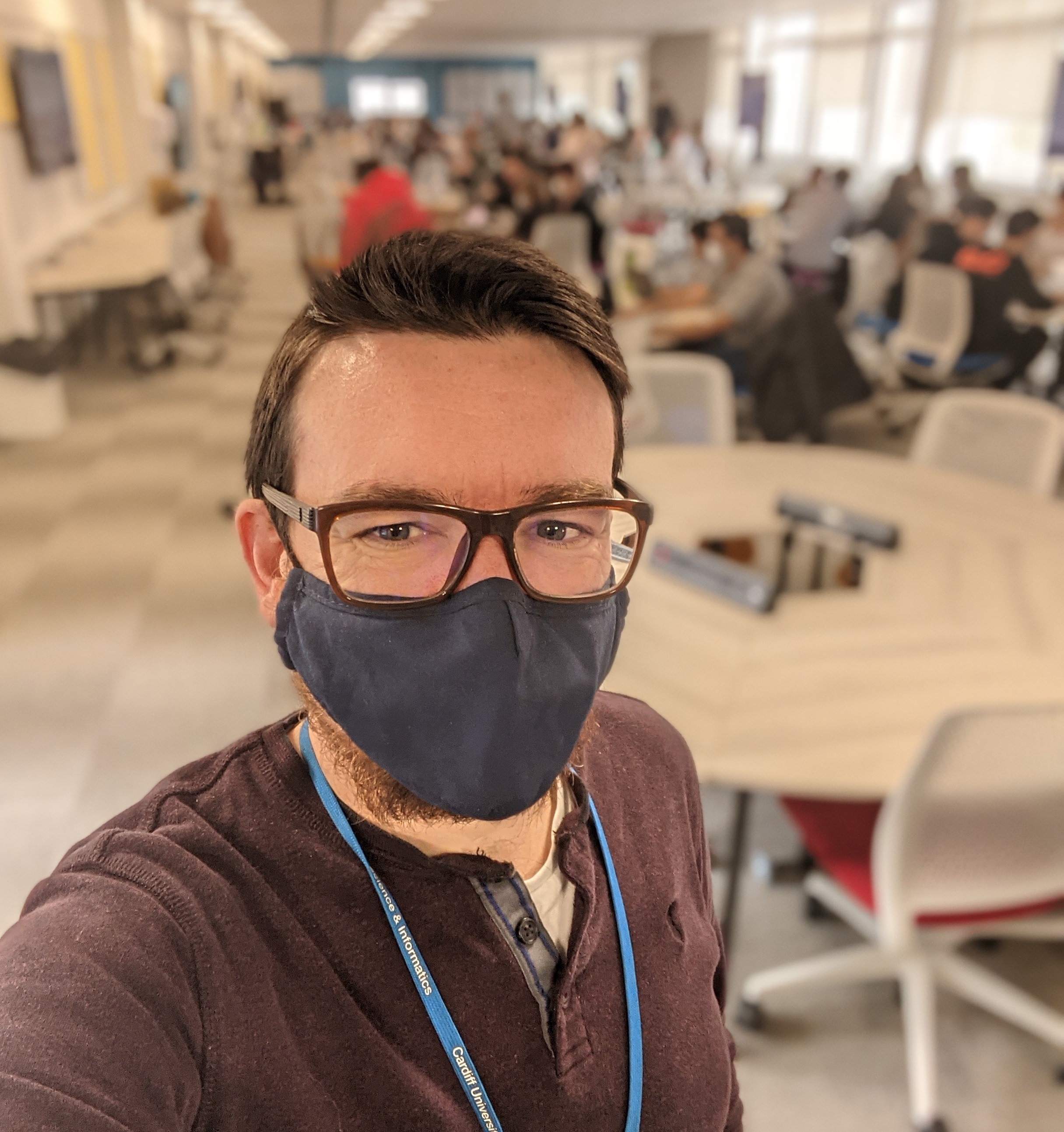
Me @ TU:E

Today I’m on a visit (with several other members of staff from the School of Computer Science and Informatics) to TU Eindhoven, being hosted by the Department of Industrial Engineering and Innovation Sciences. We’re here to talk about both teaching and research mostly on a fact-finding basis, but also with an eye towards potential future collaborations and links between the two institutions.

It’s always fascinating to visit other academic institutions, particularly in other countries. In the first instance, seeing the differences in the way they do things can be very eye-opening and lead to some interesting ideas that can hopefully bring about substantive and useful changes back home. Secondly, it is also kind of reassuring to see that there are similarities in the problems they face, and that some of the questions they are wrestling with internally are very similar to the questions we spend time discussing.

On the teaching side of things, we’ve been learning about their extensive use of problem-based learning, their cross-curricular project space, and their vision for what education at TUE will look like in 10 years time. We’ve learnt a lot, and it’s really spurred us on to think about the long-term plans for education in the School - where do we want to be in 10 years, and what will CS education look like then?

Our next step is to try and figure out the answer to that question…

Buffer

January 1, 2020

So I finally started writing again up there, but it all seems so incongruous with the post down below, which still makes me cry whenever I read it, so I think there’s some sort of buffer needed between the super-emotional ‘my mum died’ stuff and the totally fluffy “here’s a bit of useful code” stuff so here’s a break of sorts. I didn’t write this on the 16th March, but that’s very much a date connected with the start of coronavirus lockdown madness for me, so I cheated this post into this date. Bite me.

via GIPHY